Creating meshless domains
In this tutorial we will see how to:
[1]:
# import necessary libraries
import matplotlib.pyplot as plt
import torch
Some general geometries in 1D, 2D and 3D are already implemented.
[2]:
# import classical domains
from scimba_torch.domain.meshless_domain import (
    Cube3D,
    Cylinder3D,
    Disk2D,
    Disk3D,
    Polygon2D,
    Segment1D,
    Square2D,
    Torus3D,
    TorusFrom2DVolume,
)
Creating a simple Domain
To create a simple domain, simply instantiate one of the meshless_domain class with the appropriate parameters.
is_main_domain is used to specify if the domain can have subdomains/holes.[3]:
square = Square2D(
    bounds=[(-1, 1), (0, 1)],
    is_main_domain=True
)

# to reset the square domain
def simple_square():
    return Square2D(
        bounds=[(-1, 1), (0, 1)],
        is_main_domain=True
    )
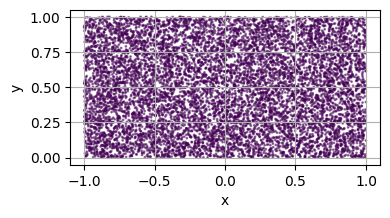
To visualise a domain, we are going to sample points on it
[4]:
# import necessary libraries
from scimba_torch.integration.monte_carlo import DomainSampler


# a utility function to plot a 2D domain
def plot_2d(domain, n=10_000, ax=None):
    """Plot a 2D domain using a Domain sampler."""

    # create the sampler
    sampler = DomainSampler(domain)

    # sample points
    res = sampler.sample(n)
    pts = res.x         # coordinates of the sampled points
    labels = res.labels # labels of the sampled points

    # convert to numpy for plotting
    pts = pts.detach().cpu().numpy()
    labels = labels.detach().cpu().numpy()

    # generate the ax if not provided
    if ax is None:
        fig = plt.figure(figsize=(4, 4))
        ax = fig.add_subplot(111, xlabel='x', ylabel='y', aspect='equal')
    else:
        fig = None
        ax.set_xlabel('x')
        ax.set_ylabel('y')
        ax.set_aspect('equal')

    # plot the points
    ax.scatter(pts[:, 0], pts[:, 1], s=1, c=labels, alpha=0.5)
    ax.grid(True)

    if fig is not None:
        fig.tight_layout()
        plt.show()

square = simple_square()
plot_2d(square)
Apply a Mapping to a Domain
For more informations about mappings, see Complement on the mapping.
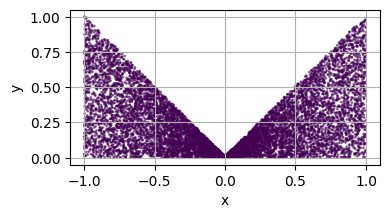
[5]:
from scimba_torch.utils.mapping import Mapping


# define a mapping function
def map(x):
    """A simple mapping function."""
    # x: (N, 2) tensor
    # out: (N, 2) transformed tensor
    return torch.stack([x[:, 0], x[:, 1]*(torch.abs(x[:, 0]) + 1e-2)], dim=1)

# define the mapping
mapping = Mapping(
    from_dim=2,     # original dimension
    to_dim=2,       # mapped dimension
    map=map,        # mapping function
    inv=None,       # optional inverse mapping function
)

# set the mapping for the square domain
square = simple_square()
square.set_mapping(
    map=mapping,
    bounds_postmap=[(-1, 1), (0, 1)], # bounding box of the MAPPED domain
)

plot_2d(square)
Create a Domain with holes
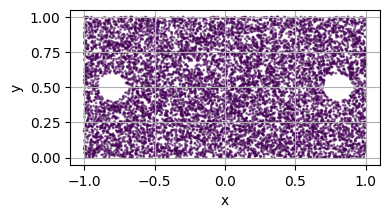
is_main_domain set to false.For example, let’s consider a disk hole inside the domain
[6]:
square = simple_square()
# create some holes
hole1 = Disk2D(center=(.8, 0.5), radius=0.1, is_main_domain=False)
hole2 = Disk2D(center=(-.8, 0.5), radius=0.1, is_main_domain=False)

# add holes to the square domain
square.add_hole(hole1)
square.add_hole(hole2)

plot_2d(square)
[7]:
# helper for resetting the domains
def simple_disks():
    disk_L = Disk2D(center=(-.8, 0.5), radius=0.1, is_main_domain=False)
    disk_R = Disk2D(center=(.8, 0.5), radius=0.1, is_main_domain=False)
    return disk_L, disk_R
Combining Holes and Mapping
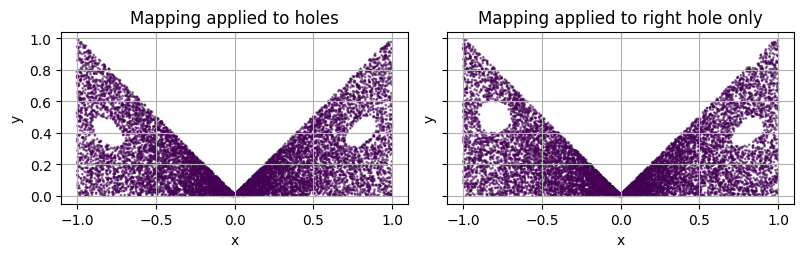
We can also combine holes and mappings.
adding a hole (if the mapping is already set), with the flag
copy_mappingset to Falsesetting the mapping for all already added holes, with the flag
to_holesset to False
Yet, we recommend to proceed in the following order:
Create the main domain
Set the mapping if any
Add holes to the domain, with
copy_mappingset to False if we do not want to apply the mapping on the hole
[8]:
fig, axs = plt.subplots(1, 3, figsize=(12, 4), sharex=True, sharey=True)

# by default, the mapping is applied to all the holes
square = simple_square()
disk_L, disk_R = simple_disks()
square.set_mapping(map=mapping, bounds_postmap=[(-1, 1), (0, 1)])
square.add_hole(disk_L)
square.add_hole(disk_R)

# plot
plot_2d(square, ax=axs[0])
axs[0].set_title('Mapping applied to holes')


# we can  specify not to apply the mapping to a specific hole when adding it
square = simple_square()
disk_L, disk_R = simple_disks()
square.set_mapping(map=mapping, bounds_postmap=[(-1, 1), (0, 1)])
square.add_hole(disk_L, copy_mapping=False)
square.add_hole(disk_R, copy_mapping=True)

# plot
plot_2d(square, ax=axs[1])
axs[1].set_title('Mapping applied to right hole only')


# # Alternatively, we can specify not to apply the mapping to already existing holes,
# # but we will prefer to set the mapping first and then add the holes
# square = simple_square()
# disk_L, disk_R = simple_disks()
# square.add_hole(disk_L)
# square.set_mapping(map=mapping, bounds_postmap=[(-1, 1), (0, 1)], to_holes=False)
# square.add_hole(disk_R)

# plot2D(square, ax=axs[2])
# axs[2].set_title('Mapping applied to right hole only')
axs[2].remove()


fig.tight_layout()
plt.show()
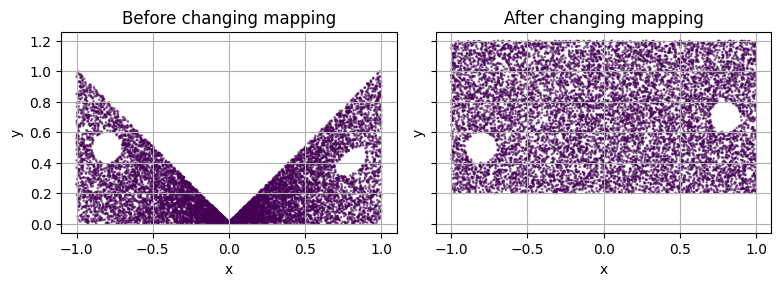
When changing the mapping of the domain (i.e. the domain was already mapped) with the flag to_holes set to False, the mapping will still be applied to previously mapped holes.
[9]:
fig, axs = plt.subplots(1, 2, figsize=(8, 4), sharex=True, sharey=True)

square = simple_square()
disk_L, disk_R = simple_disks()

# define a new mapping
mapping2 = Mapping.translate(torch.tensor([0, 0.2]))

# set the mapping for the square domain
square.set_mapping(map=mapping, bounds_postmap=[(-1, 1), (0, 1)])

# add the holes
square.add_hole(disk_L, copy_mapping=False) # left hole WITHOUT mapping
square.add_hole(disk_R)                     # right hole with mapping

# plot
plot_2d(square, ax=axs[0])
axs[0].set_title("Before changing mapping")

# apply the new mapping to the square domain
square.set_mapping(map=mapping2, bounds_postmap=[(-1, 1), (0.2, 1.2)], to_holes=False)

# plot
plot_2d(square, ax=axs[1])
axs[1].set_title("After changing mapping\n(previously mapped holes get new mapping)")

fig.tight_layout()
plt.show()
Create sub-domains
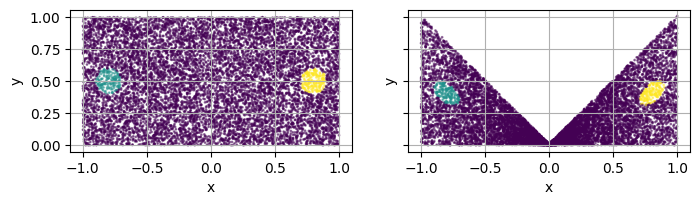
[10]:
fig, axs = plt.subplots(1, 2, figsize=(8, 4), sharex=True, sharey=True)


square = simple_square()
disk_L, disk_R = simple_disks()
square.add_subdomain(disk_L)
square.add_subdomain(disk_R)

plot_2d(square, ax=axs[0])

square.set_mapping(map=mapping, bounds_postmap=[(-1, 1), (0, 1)])
plot_2d(square, ax=axs[1])
Defining your own Domains with a custom Signed Distance Function
A Signed distance function is simply a Callable with a threshold
[11]:
# import necessary libraries
from scimba_torch.domain.meshless_domain.base import VolumetricDomain
from scimba_torch.domain.sdf import SignedDistance


class CustomSDF(SignedDistance):
    """A custom SDF class that defines the signed distance function for unit 2D disk."""

    def __init__(self):
        super().__init__(
            dim=2,
            threshold=0.0,      # threshold for inside points (sdf < -threshold)
            threshold_out=0.0,  # threshold for outside points, use for holes (sdf > threshold_out)
        )

    def __call__(self, pts: torch.Tensor) -> torch.Tensor:
        """Compute the signed distance function for the unit 2D disk."""
        # pts: (N, dim) tensor
        x, y = pts[:, 0], pts[:, 1]
        return (torch.sqrt(x**2 + y**2) - 1.0)[:, None]  # out: (N, 1) tensor


custom_domain = VolumetricDomain(
    domain_type="CustomUnitDisk",
    dim=2,
    sdf=CustomSDF(),
    bounds=[(-1, 1), (-1, 1)],
    is_main_domain=True,
)

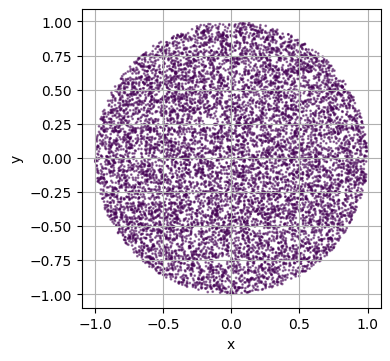
plot_2d(custom_domain)
/var/folders/zp/w4p46p_n0p52lgf7h0vpbrt00000gn/T/ipykernel_40294/3476767848.py:10: UserWarning: The domain does not have boundary domains
  sampler = DomainSampler(domain)
Boundary Domains
TODO : implement default sampling with sdf when no bc domains are given ?
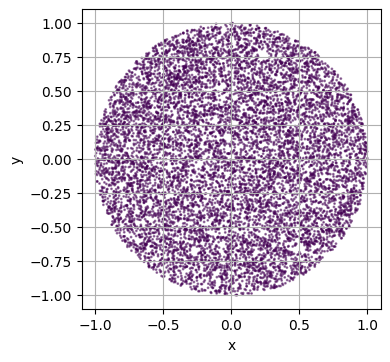
As you can see in the last example, our custom domain does not have any boundary domains…
In Scimba boundary domain (more generally called SurfacicDomains), are a “proper” domain (i.e. a VolumetricDomain) of dimension \(d\), mapped to dimension \(d+1\)
To declare such a domain, we hence need:
A
VolumetricDomain(calledparametric_domain)A
Mapping(calledsurface) that embeds ourparametric_domaininto higher dimension.
Let’s define the boundary of our unit disk.
[12]:
# import necessary libraries
from scimba_torch.domain.meshless_domain.base import SurfacicDomain

bc = SurfacicDomain(
    domain_type="CustomUnitCircle",
    parametric_domain=Segment1D((0, 2 * torch.pi)),
    surface=Mapping(
        from_dim=1,
        to_dim=2,
        map=lambda x: torch.stack([torch.cos(x[..., 0]), torch.sin(x[..., 0])], dim=-1),
    ),
)

# we then add the boundary domain to our custom domain
custom_domain.add_bc_domain(bc)

# we don't have a warning anymore :)
plot_2d(custom_domain)
Let’s create a new plotting utility function to see what’s happening.
[13]:
# a utility function to plot a 2D domain and boundary points
def plot_2d_with_bc(domain, n=10_000, n_bc=1_000, ax=None):
    """Plot a 2D domain using a Domain sampler."""

    cmap = plt.get_cmap("tab10_r")

    # create the sampler
    sampler = DomainSampler(domain)

    # sample points
    res = sampler.sample(n)
    pts = res.x         # coordinates of the sampled points
    labels = res.labels # labels of the sampled points

    # sample boundary points
    res_bc, _ = sampler.bc_sample(n_bc)
    pts_bc = res_bc.x           # coordinates of the sampled boundary points
    labels_bc = res_bc.labels   # labels of the sampled boundary points

    # convert to numpy for plotting
    pts = pts.detach().cpu().numpy()
    labels = labels.detach().cpu().numpy()
    pts_bc = pts_bc.detach().cpu().numpy()
    labels_bc = labels_bc.detach().cpu().numpy()

    # generate the ax if not provided
    if ax is None:
        fig = plt.figure(figsize=(4, 4))
        ax = fig.add_subplot(111, xlabel="x", ylabel="y", aspect="equal")
    else:
        fig = None
        ax.set_xlabel("x")
        ax.set_ylabel("y")
        ax.set_aspect("equal")

    # offset the labels for boundary points
    labels_bc += labels.max() + 1
    max_label = max(labels.max(), labels_bc.max())

    # plot the points
    ax.scatter(
        pts[:, 0],
        pts[:, 1],
        s=1,
        c=labels,
        alpha=0.5,
        cmap=cmap,
        vmin=0,
        vmax=max_label,
    )

    # plot the boundary points
    ax.scatter(
        pts_bc[:, 0],
        pts_bc[:, 1],
        s=1,
        c=labels_bc,
        cmap=cmap,
        vmin=0,
        vmax=max_label,
        alpha=0.5,
    )

    if fig is not None:
        fig.tight_layout()
        plt.show()


plot_2d_with_bc(custom_domain)
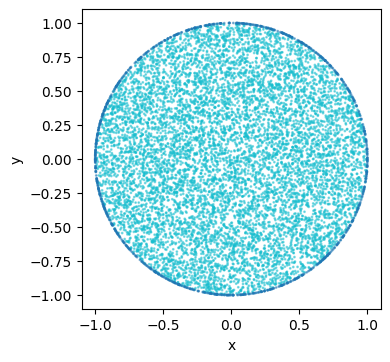
!Warning! Be aware that their is not check or whatsoever to see it the given boundary domain is really the boundary of the given domain.
Square2D domain implements full_bc_domain, which returns a list of SurfacicDomains that represent the boundary of a square.full_bc_domain.Complement on the mapping
Note that the Mapping can take extra arguments:
jacto declare the jacobian of the mapping (if not provided, it is computed using torchtorch.func.jacrev)invto be declared if the mapping is considered invertibleinv_jacfor the jacobian of the inverse (otherwise computed asjac)
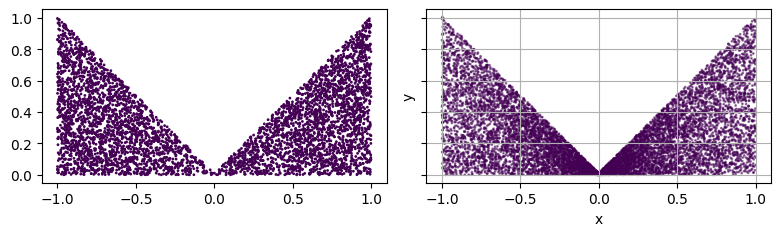
sample_post_map.[14]:
from scimba_torch.integration.monte_carlo import SurfacicSampler, VolumetricSampler


# define a mapping function
def map(x):
    """A simple mapping function."""
    return torch.stack([x[:, 0], x[:, 1]*(torch.abs(x[:, 0]) + 1e-2)], dim=1)

# define the inverse mapping function
def inv(y):
    """Inverse of the mapping function."""
    return torch.stack([y[:, 0], y[:, 1]/(torch.abs(y[:, 0]) + 1e-2)], dim=1)


# define the mapping
mapping = Mapping(
    from_dim=2,
    to_dim=2,
    map=map,
    inv=inv
)

square = simple_square()

# set the mapping for the square domain
square.set_mapping(
    map=mapping,
    bounds_postmap=[(-1, 1), (0, 1)],
)

# create the sampler
sampler = VolumetricSampler(square)

# sample points
pts = sampler.sample_postmap(5_000)
pts = pts.detach().cpu().numpy()

# plot the points
fig, axs = plt.subplots(1, 2, figsize=(8, 4), sharex=True, sharey=True)
axs[0].scatter(pts[:, 0], pts[:, 1], s=1, c=torch.zeros(pts.shape[0]).numpy())
axs[0].set_aspect('equal')

plot_2d(square, ax=axs[1])
fig.tight_layout()
plt.show()
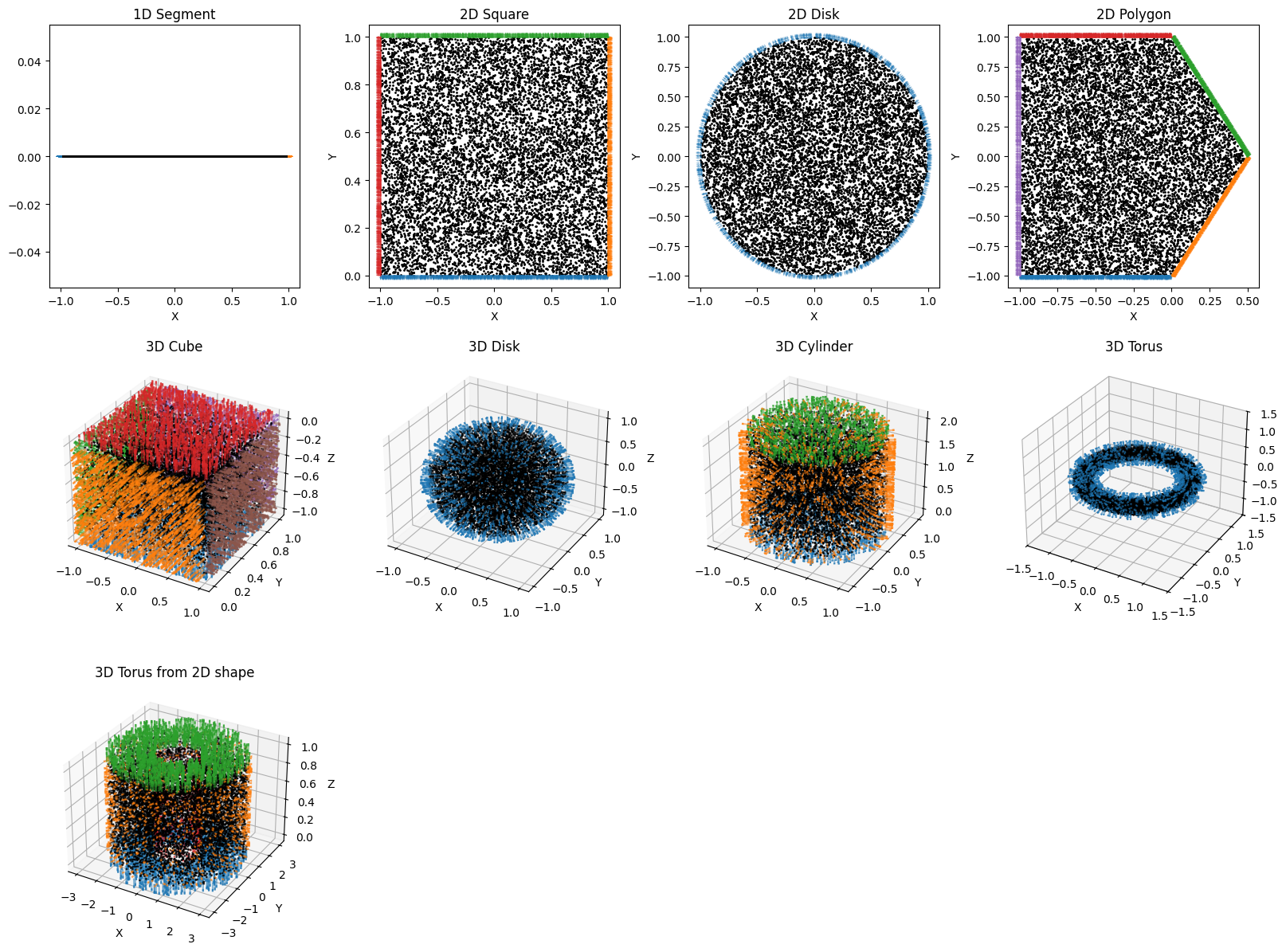
Available domain showcase
[15]:
# 1D domains
segment = Segment1D(
    low_high=(-1, 1),
    is_main_domain=True
)

# 2D domains
square = Square2D(
    bounds=[(-1, 1), (0, 1)],
    is_main_domain=True
)

disk = Disk2D(
    center=(0, 0),
    radius=1,
    is_main_domain=True
)
polygon = Polygon2D(
    # vertices of the polygon, they should be provided in counter-clockwise order
    vertices=[[-1, -1], [0, -1], [.5, 0], [0, 1], [-1, 1]],
    is_main_domain=True
)

# 3D domains
cube = Cube3D(
    bounds=[(-1, 1), (0, 1), (-1, 0)],
    is_main_domain=True
)
disk3d = Disk3D(
    center=(0, 0, 0),
    radius=1,
    is_main_domain=True
)
cylinder = Cylinder3D(
    radius=1,
    length=2,
    is_main_domain=True
)
torus = Torus3D(
    center=(0, 0, 0),
    radius=1,
    tube_radius=0.2,
    is_main_domain=True
)
torus_from2d = TorusFrom2DVolume(
    base_volume=square,
    radius=2,
    is_main_domain=True
)
[16]:
# import necessary libraries
from scimba_torch.integration.monte_carlo import VolumetricSampler


# utility function to sample and plot points in a domain
def plot(dict_dom2ax, n=10_000, n_bc=1000):
    for domain, ax in dict_dom2ax.items():
        # create a sampler for the domain
        sampler = VolumetricSampler(domain)
        bc_sampler = [SurfacicSampler(bc) for bc in domain.full_bc_domain()]
        # sample N points
        pts = sampler.sample(n)
        bc_pts = [
            bc_sampler[i].sample(n_bc, compute_normals=True)
            for i in range(len(bc_sampler))
        ]
        # convert to numpy for plotting (& normalize normals)
        pts = pts.detach().numpy()
        bc_pts = [
            (bc, 0.1 * n / torch.linalg.norm(n, axis=-1, keepdims=True))
            for bc, n in bc_pts
        ]
        bc_pts = [(bc[0].detach().numpy(), bc[1].detach().numpy()) for bc in bc_pts]

        def get_pts(pts):
            if domain.dim == 1:
                return pts[:, 0], [0] * len(pts)
            elif domain.dim == 2:
                return pts[:, 0], pts[:, 1]
            elif domain.dim == 3:
                return pts[:, 0], pts[:, 1], pts[:, 2]
            else:
                raise ValueError("Domain dimension not supported for plotting.")

        ax.scatter(*get_pts(pts), color="k", s=1)  # plot the sampled points

        for i, (bc, nn) in enumerate(bc_pts):
            ax.scatter(
                *get_pts(bc), s=1, c=f"C{i}", alpha=0.2
            )  # plot the boundary points
            ax.quiver(
                *get_pts(bc), *get_pts(nn), color=f"C{i}", alpha=0.5
            )  # plot the boundary normals


fig = plt.figure(figsize=(16, 12))
dict_dom2ax = {
    segment: fig.add_subplot(3, 4, 1, xlabel="X", title="1D Segment"),
    square: fig.add_subplot(3, 4, 2, xlabel="X", ylabel="Y", title="2D Square"),
    disk: fig.add_subplot(3, 4, 3, xlabel="X", ylabel="Y", title="2D Disk"),
    polygon: fig.add_subplot(3, 4, 4, xlabel="X", ylabel="Y", title="2D Polygon"),
    cube: fig.add_subplot(
        3, 4, 5, projection="3d", xlabel="X", ylabel="Y", zlabel="Z", title="3D Cube"
    ),
    disk3d: fig.add_subplot(
        3, 4, 6, projection="3d", xlabel="X", ylabel="Y", zlabel="Z", title="3D Disk"
    ),
    cylinder: fig.add_subplot(
        3,
        4,
        7,
        projection="3d",
        xlabel="X",
        ylabel="Y",
        zlabel="Z",
        title="3D Cylinder",
    ),
    torus: fig.add_subplot(
        3,
        4,
        8,
        projection="3d",
        xlabel="X",
        ylabel="Y",
        zlabel="Z",
        xlim=(-1.5, 1.5),
        ylim=(-1.5, 1.5),
        zlim=(-1.5, 1.5),
        title="3D Torus",
    ),
    torus_from2d: fig.add_subplot(
        3,
        4,
        9,
        projection="3d",
        xlabel="X",
        ylabel="Y",
        zlabel="Z",
        title="3D Torus from 2D shape",
    ),
}

# plot the domains
plot(dict_dom2ax)
fig.tight_layout()
plt.show()
Using the threshold to avoid sampling near the boundary
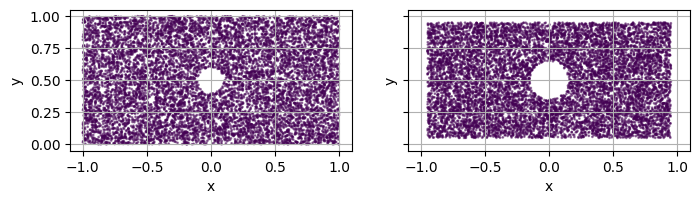
set_threshold on a main domain.threshold (resp. threshold_out) of the main domain (resp. holes).domain.sdf.threshold for the domain and hole.sdf.threshold_out for each hole.TODO : “uniformize” sdf of domains ?
[17]:
fig, axs = plt.subplots(1, 2, figsize=(8, 4), sharex=True, sharey=True)

square = simple_square()
hole = Disk2D(center=(0, 0.5), radius=0.1, is_main_domain=False)
square.add_hole(hole)

# plot with default threshold
plot_2d(square, ax=axs[0])

# set a threshold to avoid sampling near the boundary
square.set_threshold(0.05)
plot_2d(square, ax=axs[1])